GBWhatsApp Channel | How to Set Up Your Channel in 2026
GBWhatsApp Channel | How to Set Up Your Channel in 2026
There is a feature sitting inside GB WhatsApp right now that most users scroll past every single day without realising what it can do for them.
It is not a new theme. It is not a privacy setting. It is something far more powerful than either of those things.
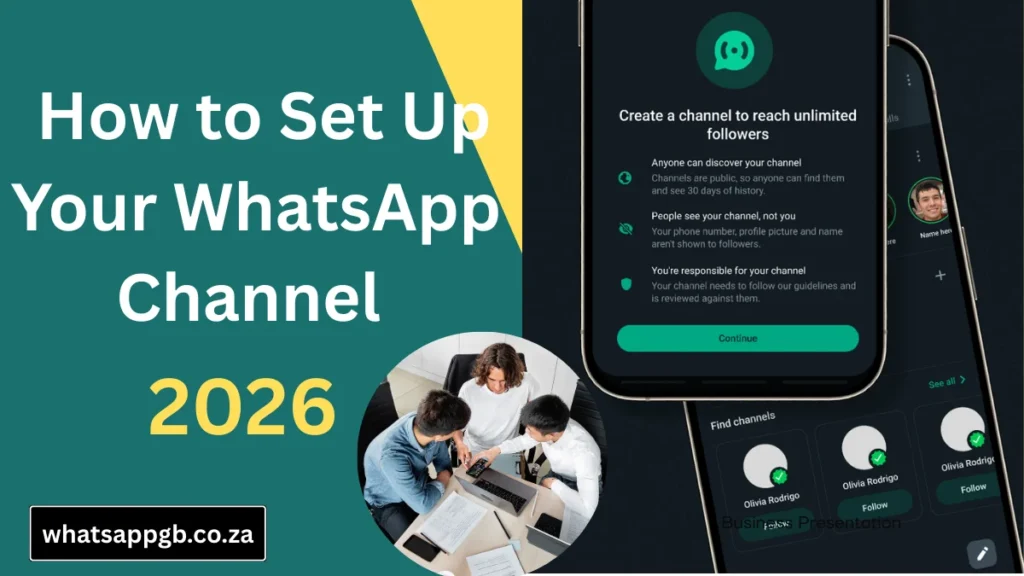
It is called a Channel. And if you create content, run a business, manage a community, or simply want a direct line to the people who matter to you setting one up today could change how you communicate forever.
This is the complete guide. Everything from what a Channel actually is, to how to build one, grow it, and use it properly. No fluff. No filler. Just everything you need to know.
What Exactly Is a GB WhatsApp Channel
Think of a GB WhatsApp Channel like a broadcast station that lives inside the app. You are the broadcaster. Your followers are the audience. Every update you send goes directly to every single person who follows your Channel, sitting neatly in their Updates tab alongside their status updates.
Nobody can interrupt. Nobody can derail the conversation. No algorithm decides whether your update gets seen or buried. You post. They see it. Every time.
It is fundamentally different from a group chat. In a group chat, everyone talks. Messages pile up. Conversations go in ten directions at once. A Channel is clean, focused, and entirely under your control. You speak. Your followers listen. That is the whole model and it works beautifully.
The privacy element is worth highlighting too. Your followers are completely anonymous to each other. Nobody following your Channel can see who else is following it. They see your content and nothing else. For the people following you, it is a private and comfortable experience. For you as the creator, it means people are far more willing to follow because there is no social exposure involved.
Why GB WhatsApp Channels Beat Most Other Broadcast Platforms
This is the question worth asking before you invest any time into building a Channel. Why here? Why GB WhatsApp? Why not Instagram, Telegram, or a newsletter?
The answer is reach and directness. Your audience is already on WhatsApp. They check it every day, often many times a day. When you post on Instagram, an algorithm decides how many of your followers actually see it. When you send an email newsletter, open rates average somewhere between twenty and thirty percent on a good day. When you post on your GB WhatsApp Channel, every single follower sees it in their Updates tab. One hundred followers means one hundred people who see your update. Ten thousand followers means ten thousand people.
No boosted posts. No fighting for visibility. No paying to reach the people who already chose to follow you.
For small businesses sharing daily deals, educators sharing study notes, news pages sharing breaking updates, coaches sharing daily motivation, or creators sharing exclusive content — this level of direct access to your audience is genuinely rare in 2026.
Before You Create Your Channel Get These Things Ready
Jumping straight into Channel creation without preparation is how you end up with a Channel that looks unfinished and fails to attract followers from day one.
Spend five minutes getting these things ready first.
Your Channel name should be clear and immediately descriptive. Someone who has never heard of you should be able to read your Channel name and understand roughly what you share. Keep it short. Keep it memorable. Avoid clever names that sacrifice clarity.
Your Channel description is your pitch to potential followers. You have a few sentences to tell someone exactly what they will get by following you and why it is worth their time. Be specific. “Daily digital marketing tips for small business owners” is a description that converts visitors into followers. “Welcome to my Channel” is a description that converts nobody.
Your Channel photo should be clean and recognisable at a small size. Channel photos appear as small thumbnails in the Updates tab. A detailed illustration or a busy image will look like a blur at that size. A clean logo, a simple icon, or a clear close-up photo works far better.
Finally, make sure you are running the latest version of GB WhatsApp. Older builds may have limited Channel functionality or missing features. Download the most current APK from whatsappgb.co.za before you begin.
How to Create Your GB WhatsApp Channel Step by Step
Open GB WhatsApp on your phone. At the bottom of the screen you will see your main navigation tabs. Tap the Updates tab. This is where both Status updates and Channels live together.
At the top of the Updates screen you will see a Channels section. If you have not created or followed any Channels yet, you will see a prompt to get started. Look for the plus icon or the Create Channel option and tap it.
GB WhatsApp will now guide you through the creation process one step at a time.
The first screen asks for your Channel name. Type the name you prepared. You can edit this later but getting it right from the start saves unnecessary confusion for early followers.
The next screen asks for your Channel description. Write your two or three sentence pitch here. Tell visitors exactly what kind of content you post, how often you post, and who the Channel is designed for. A strong description is the difference between a visitor following and a visitor leaving.
The final setup screen asks for your Channel photo. Tap the image area and select a photo from your gallery. Choose your cleanest, most recognisable image.
Once all three fields are complete, tap Create Channel. Your Channel goes live immediately.
The First Things to Do After Your Channel Goes Live
Most people create their Channel and then immediately start sharing the link everywhere. That is a mistake. Before you invite anyone, spend a few minutes making sure your Channel is properly configured.
Open your Channel and tap your Channel name at the top to access the Channel info and settings screen.
Check that your name, description, and photo all look exactly right. What looks good in the setup flow sometimes looks different once the Channel is actually live. Make any adjustments now before your first followers arrive.
Find the discoverability setting. This controls whether your Channel appears in search results inside GB WhatsApp. If you are building a public Channel for a wide audience, make sure discoverability is turned on. If you are running a private Channel for a specific group such as a team, a classroom, or a membership community, turn discoverability off and share access only through your direct Channel link.
Generate your Channel link from the settings screen. This is the link you will share outside GB WhatsApp to bring in followers from your other platforms. Copy it and save it somewhere accessible because you are going to be sharing it a lot.
How to Post Content That People Actually Read
Having followers means nothing if they stop paying attention to what you post. The way you share content on your Channel matters as much as what you share.
Keep text updates short and direct. Your followers are scrolling through their Updates tab alongside status updates from everyone they know. A wall of text is easy to skip. Three clear sentences with the key information included is far more likely to be read in full.
Use photos and videos whenever the content suits them. GB WhatsApp lets you send media at original quality, which is one of the genuine advantages it holds over the official app. A sharp, well-composed photo communicates more than a paragraph of text in most situations. Use this capability. Blurry or heavily compressed media makes your Channel look unprofessional regardless of how good the content actually is.
Include links when you want to direct followers toward something more detailed. If you run a website, a YouTube channel, a podcast, or any other platform with longer content, your GB WhatsApp Channel is an excellent funnel for driving traffic there. Share a short compelling teaser in the Channel update and include the link for followers who want to go deeper.
Post on a schedule your audience can predict. Consistency is what separates Channels that grow from Channels that stagnate. You do not need to post twenty times a day. Three or four quality updates per week, posted at consistent times, builds a habit in your followers. They start expecting your content. They look for it. That is when a Channel becomes genuinely valuable.
How to Grow Your GB WhatsApp Channel From Zero
The most common question after creating a Channel is how to get the first followers. Then how to get the next hundred. Then the next thousand.
The answer starts with where your audience already exists.
Share your Channel link everywhere you already have a presence. Put it in your Instagram bio. Add it to your Facebook page about section. Include it as a clickable link in your email signature. If you have a website or a blog, add a prominent follow button or banner that links directly to your Channel. Every platform where you have built even a small following is an opportunity to convert those followers into GB WhatsApp Channel subscribers.
Tell people specifically why they should follow. Do not just share a link with no context. Tell your audience exactly what they will get. “Follow my GB WhatsApp Channel for daily deals every morning” gives people a concrete reason to click. A bare link with no explanation gives them nothing.
Ask your current followers to share your Channel with one person they know. Word of mouth growth is still among the most powerful and most underused tools available to Channel creators. A simple post asking your existing followers to forward your Channel link to one friend who would find it useful can meaningfully accelerate your growth without spending a single cent.
Collaborate with other Channel creators in your niche. Mention each other in updates. Share each other’s links with your respective audiences. A collaboration between two Channels with complementary audiences benefits both sides and exposes each creator to a new group of potential followers.
Post your Channel link in relevant WhatsApp groups where it is appropriate and welcome to do so. Be genuine about it. Introduce your Channel, explain what it offers, and let interested members choose to follow. Do not spam groups with your link. That approach damages your reputation far more than it grows your audience.
Managing Your Channel as Your Audience Grows
A small Channel and a large Channel require different levels of management. As your follower count grows, a few habits will keep everything running smoothly.
Review and refresh your Channel description every few months. Content evolves and your description should reflect what you are actually posting now rather than what you planned to post when you created the Channel. An accurate and current description helps new visitors make a quick and confident decision about following.
Track your follower growth from the Channel info screen. Paying attention to which types of updates drive the most new followers helps you understand what your audience values. Double down on what works. Adjust or drop what does not.
If you ever need to remove an update after posting it, tap and hold the update inside your Channel and select the delete option. Deleted updates disappear from the Channel feed for all followers immediately.
If your Channel serves different purposes for different audiences, consider creating separate Channels for each. GB WhatsApp allows multiple Channels under one account. A business owner might run one Channel for customer offers and a separate Channel for industry insights. Keeping content focused and audience-specific produces better results than mixing unrelated topics in a single Channel.
Answers to the Questions Every New Channel Creator Asks
Can my followers send me messages through the Channel? Followers cannot send messages inside the Channel feed. They can react to your updates with emoji reactions, which gives you a sense of engagement without turning the Channel into a conversation. If you want to receive direct messages from followers, include your contact details or a link to a separate chat in your Channel description.
Do my followers know each other? No. Follower identities are entirely private. Nobody following your Channel can see who else follows it. Only you as the Channel admin can see your total follower count. This privacy makes people far more comfortable following because there is no social visibility involved.
Is there a maximum number of followers? There is no follower cap on GB WhatsApp Channels. Your Channel can grow to any size without hitting a ceiling.
Can I run more than one Channel? Yes. You can create and manage multiple Channels from the same GB WhatsApp account. Each Channel is completely separate with its own name, description, photo, and follower list.
Will my followers see my personal phone number? Followers see your Channel name and Channel photo only. Your personal phone number is not visible to them through the Channel in any way.
What happens if I delete my Channel? Deleting a Channel is permanent. All updates, all follower data, and the Channel itself are removed and cannot be recovered. Think carefully before deleting. If you simply want to take a break from posting, you can stop posting without deleting the Channel and your followers will remain.
The Difference Between a Good Channel and a Great One
Anyone can create a GB WhatsApp Channel in five minutes. The Channels that build real audiences and deliver real value share a few qualities that separate them from the ones that stagnate at a handful of followers.
A great Channel has a specific focus. It is not trying to be everything to everyone. It serves a defined audience with a defined type of content. Followers know exactly what they signed up for and they keep following because the Channel consistently delivers it.
A great Channel posts consistently. Not obsessively. Not sporadically. On a schedule that the audience can rely on.
A great Channel treats its followers as the asset they are. Every update is created with the follower in mind. What do they need to know? What will make their day easier, more informed, or more entertaining? Channels that think about their audience first build loyalty. Channels that use their audience purely as a number to grow eventually lose them.
Start with clarity. Post with consistency. Always put your audience first. That is the formula.
Final Thoughts
GB WhatsApp Channels give you something that most platforms have spent years making harder to achieve — a direct, unfiltered line to your audience. No algorithm standing between you and the people who chose to follow you. No paying to reach followers you already earned. Just your content, their attention, and the relationship you build between the two.
The setup takes five minutes. The potential is genuinely significant.
Create your Channel today. Write a description that gives people a real reason to follow. Share your link everywhere your audience already exists. Post consistently and put your followers first in every update you send.
Everything you need to get started is right here at whatsappgb.co.za including the latest GB WhatsApp APK download to make sure you are running the most current version before you begin.